Objects
The Objects view lists a model's objects, to show or hide each one and to select them. It's for a model of more than one object, and turns on by itself when one opens.
The list
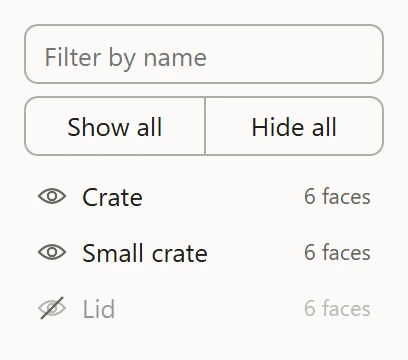
Each object is a row, with how many faces it has. A .3ds or .i3d model's objects nest as its file places them, one inside another. A row with no mesh of its own, such as a bone, groups the ones under it: click its arrow to fold them away or unfold them.
Type in Filter by name to list only the objects whose names hold what you type.
Showing and hiding
Click an object's eye to show or hide it: just that object, not the ones under it. Show all and Hide all do every object at once. A hidden object leaves both views, and the tools leave its UVs alone. Materials can be shown and hidden too, in the Textures section: a face shows only while both its object and its material do.
Selecting
Click an object's name to select it, or double-click to select everything under it too. Shift or Ctrl adds to the selection, or takes out. F then frames the selection.